Controller & Gamepad Input Mapping
Complete guide to Mission Control's interactive Native XInput & DirectInput Gamepad Configurator, custom action combos, analog stick deadzone tuning, and force feedback haptics.
Controller & Gamepad Input Mapping
Unified Hardware Gamepad Abstraction, Real-Time Polling & Custom Haptics
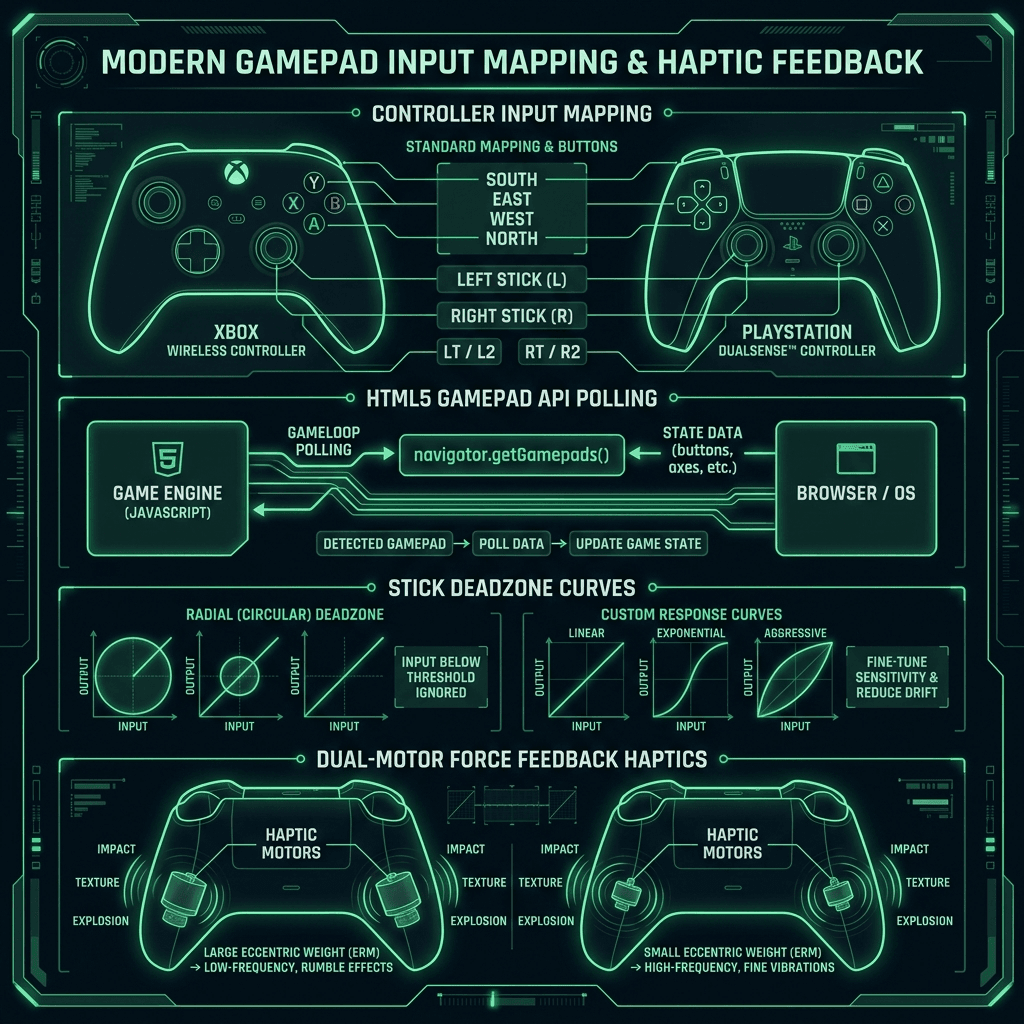
Mission Control features full dual-stack Gamepad hardware support acrossXInput,DirectInput, and the nativeWindows Input Subsystem. Whether you play with an Xbox Wireless Controller, DualSense, DualShock 4, or generic DirectInput gamepad, Mission Control auto-detects and binds hardware inputs in real time.
Key Features
- Interactive Visual SVG Diagram: Real-time neon-green button highlights and stick vector indicators for both Xbox and PlayStation button layouts.
- Custom Feature Action Binds:
LB + RB: Multi-button instant Boost overlay trigger.D-PAD UP: Activates Aero AI Voice Assistant.Y / Triangle: Triggers Tactical Recon overlay analysis.X / Square: Performs automated Story & Cutscene Auto-Skip.SELECT / SHARE: Toggles HUD overlay visibility.
- Analog Stick Deadzone Control: Configurable deadzone filtering (5% to 35%) to eliminate drift on worn analog sticks.
- Dual-Motor Haptics Vibration: Live test suite for left (heavy low-frequency rumble) and right (high-frequency haptic impulse) vibration motors via XInput
XInputSetState.
Supported Controller Architectures
| Controller Family | Detection Mechanism | Native Vibration | Special Features |
|---|---|---|---|
| Xbox Wireless / Elite | Native XInput & Windows Input API | Dual Impulse Motors | Full Guide Button & Trigger Haptics |
| PlayStation DualSense / DS4 | DirectInput & Pygame Daemon | Dual Actuators | Adaptive Trigger telemetry mapping |
| Generic DirectInput | Pygame / WinMM Fallback | Single Motor | Auto-mapping fallback profile |
Python Backend Integration — input_manager.py
The backend Python daemon routes gamepad inputs directly to system macros and overlay functions:
Python# System IPC handler for controller vibration from control.input_manager import input_manager # Trigger haptic impulse feedback (0.0 to 1.0 intensity) input_manager.trigger_rumble(left_motor=0.8, right_motor=0.5, duration_ms=300)
You can fine-tune your controller deadzones directly inSettings -> Controller & Input Mappinginside the desktop app or web dashboard.