Process & Threading
This document outlines the step-by-step process for releasing a new version of the AI Gaming Assistant. The entire pipeline is automated using PowerShell and Py...
🚀 Automated Publishing Process
This document outlines the step-by-step process for releasing a new version of the AI Gaming Assistant. The entire pipeline is automated using PowerShell and Python to handle versioning, changelog generation, and GitHub deployment.
🏁 Quick Release Workflow (Cheat Sheet)
Always execute all commands from the project root directory (Mission-Control):
🪟 Windows (PowerShell)
PowerShell# Bumps version, compiles PyInstaller backend & Electron packages, tags commit, and pushes to GitHub .\Gaming\scripts\publish.ps1 "Fixed Alienware CPU thermals & optimized website"
🐧 Linux (Bash Terminal)
Bash / Terminal# Bumps version, compiles Linux AppImage/deb/rpm packages, tags commit, and pushes to GitHub ./Gaming/scripts/publish.sh "Fixed Alienware CPU thermals & optimized website"
🛠️ Step 1: Prepare Your Release
Before triggering a publish, ensure you have:
- Verified Stability: Ensure the application launches without errors.
- Media (Optional): If you want to include a visual preview in the release notes, have an image URL or local path ready.
- Clean Workspace: It's recommended to commit large binary changes separately before running the release script.
📦 Step 2: Run the Publish Script
The publish.ps1 script is your one-stop tool for all release types. Open PowerShell in the project root directory (Mission-Control) and choose a mode:
Mode A: Simple Patch (Recommended for quick fixes)
If you just have a single fix or small update, use the simplified one-argument syntax. This automatically bumps the patch version.
PowerShell.\Gaming\scripts\publish.ps1 "Fixed WiFi SSID detection logic"
Mode B: Multi-line & Detailed Release Notes (Semicolons & Arguments)
Include multi-line bullet points in your release notes by separating items with semicolons ;, pipes |, or by passing multiple quoted arguments:
PowerShell# Option 1: Semicolon-separated single string (headline + bullet points) .\Gaming\scripts\publish.ps1 "Fixed Update Pause Flow; Unlocked Hardware Max TGP; Suppressed Terminal Popups" # Option 2: Multiple quoted arguments .\Gaming\scripts\publish.ps1 "v2.1.0 Major Update" "Fixed Update Pause/Cancel flow" "Unlocked hardware TGP on laptops" "Removed chassis TGP tag in UI" # Option 3: Explicit -Changes parameter .\Gaming\scripts\publish.ps1 -Title "Performance Release" -Changes "Improved fan curve response", "Optimized VRAM monitoring"
Mode C: Major / Minor Feature Release
Use this mode for major or minor updates where you want to specify the version bump type (minor or major):
PowerShell.\Gaming\scripts\publish.ps1 "Agentic AI Update" "Integrated NVIDIA NIM" "Added Racing genre support" -Type minor
Mode D: Visual Release (With Optional Image)
Include an image in your release notes by using the -Image parameter:
PowerShell.\Gaming\scripts\publish.ps1 "New HUD Aesthetics" -Image "https://i.imgur.com/example.png"
Mode E: Manual Version Release (Override Auto-Bump)
If you want to set an exact, specific version number (e.g., forcing a jump to 2.2.0 or resetting versions), use the -Version parameter:
PowerShell.\Gaming\scripts\publish.ps1 "Forcing release version" -Version "2.2.0"
🤖 AI Release Notes & Mermaid Diagram Generation
Whenever you trigger .\Gaming\scripts\publish.ps1 "Your Update Summary", the pipeline executes bump_version.py which includes an integrated AI Release Notes Enricher:
- NVIDIA NIM AI Integration:
- Queries
meta/llama-3.1-8b-instructusingNVIDIA_API_KEY(from environment or.envfiles). - Automatically expands your raw update notes into technical feature bullet points, architectural decisions, and a file changes table.
- Queries
- Mermaid Flowchart Generator:
- Automatically generates a dynamic Mermaid system architecture diagram (e.g.
mermaid graph TD ...) illustrating the workflow of your changes.
- Automatically generates a dynamic Mermaid system architecture diagram (e.g.
- Real-Time Website Documentation Sync:
- Appends the enriched release entry directly to
Gaming/docs/changes_summary.md, which streams into MongoDB and updates the website's/docs/changes_summarypage in real time.
- Appends the enriched release entry directly to
🏗️ Release Build Architecture (Woodpecker CI)
When you trigger .\run_local.ps1, the pipeline executes the following sequence:
backend-deps: Creates an isolated virtual environment and installs dependencies usinguv.stamp-version(Critical Order): Bumps and syncs the release version inGaming/backend/version.json,Gaming/frontend/package.json,Gaming/website/package.json, andGaming/docs/changes_summary.md.ℹ️NoteStamping automatically appends the new release patch notes directly into
Gaming/docs/changes_summary.md. On runtime request or deployment, the website's/docs/changes_summarypage syncs these changes into MongoDB in real time so release notes are always up to date.compile-backend: Bundles the Python code into a standalone binary using PyInstaller viabuild_app.ps1.- Bundle Optimization: To avoid compilation stutters, dynamic import errors (such as ChromaDB telemetry/posthog failures), and package bloat, the MissionControl.spec file dynamically walks ChromaDB to include all submodules while explicitly excluding unused vector adapters from
mem0(like Weaviate, Pinecone, Milvus) andchromadbtesting packages. - Standalone Execution: You can also trigger backend compilation and sync directly via:
PowerShell
powershell -ExecutionPolicy Bypass -File .\Gaming\scripts\build_app.ps1
- Bundle Optimization: To avoid compilation stutters, dynamic import errors (such as ChromaDB telemetry/posthog failures), and package bloat, the MissionControl.spec file dynamically walks ChromaDB to include all submodules while explicitly excluding unused vector adapters from
move-backend: Copiesdist/MissionControlBackendtoGaming/frontend/backend/MissionControlBackend. Note:electron-builderreads the backend directly from../backend/dist/MissionControlBackendviaextraResources— this step also mirrors it into thefrontend/backend/folder as a legacy artefact.compile-frontend: Executesnpm run build(tsc -b && vite build) insideGaming/frontendto ensure the TypeScript type-checks pass and the latest React UI bundles are emitted todist/anddist-electron/.package-electron: Packages the Electron application containing the compiled backend and frontend:- Windows (
publish.ps1): Packages Windows installers (nsis,msi,zip). - Linux (
publish.sh): Packages Linux distributions (AppImage,deb,rpm,tar.gz).
ℹ️Noteelectron-buildercannot build LinuxAppImagetargets on a native Windows host without Administrator/Developer Mode symlink privileges, as Node.js encountersEPERM: operation not permitted, symlinkerrors. Therefore,publish.ps1automatically builds Windows targets (--win) on Windows hosts, whilepublish.shbuilds Linux targets (--linux) on Linux environments.- Windows (
build-nsis & linux-targets: GeneratesMissionControl-Setup.exe(Windows) andMissionControl-Linux.AppImage(Linux) release artifacts.release: Publishes compiled setup installers andlatest.ymlrelease manifest assets directly onto GitHub.
Cross-Platform Linux Publishing
To execute the automated release workflow on Linux machines, run:
Bash / Terminal./Gaming/scripts/publish.sh "Release v2.9.6: Add Linux Support"
🪟 Automated Windows Package Manager (WinGet) Deployment
SYSTEM ARCHITECTURE DIAGRAMMERMAID SVG ENGINEGenerating visual flowchart...
Whenever you publish a release via .\Gaming\scripts\publish.ps1 "...", the following automated WinGet workflow executes:
1. Local Manifest Sync & SHA-256 Checksums
publish.ps1runssync_version.pywhich creates the version directory inGaming/winget/manifests/a/arnab825/MissionControl/<version>/and updates the singleton manifestGaming/winget/arnab825.MissionControl.singleton.yaml.- The script automatically stages and commits these manifests into the release commit.
2. Cloud Submission to microsoft/winget-pkgs (GitHub Action)
- As soon as
publish.ps1pushes the git release tagv<version>, the GitHub Action.github/workflows/deploy_app.ymltriggers automatically. - The
publish-to-wingetjob extracts the clean version number, resolves the release installer URL, computes the SHA-256 hash, and opens a Pull Request to microsoft/winget-pkgs automatically usingwinget-releaser. - Required Repository Secret: Set
WINGET_GH_TOKEN(orGH_TOKEN) in GitHub Repository Settings → Secrets and variables → Actions with a Personal Access Token havingpublic_reposcope.
3. User Installation & Upgrade Commands
Once approved on Microsoft's repository, users worldwide can install and upgrade with single commands:
PowerShell# Install latest release winget install arnab825.MissionControl # Upgrade an existing installation winget upgrade arnab825.MissionControl # Uninstall Mission Control cleanly winget uninstall arnab825.MissionControl # Upgrade all system packages including Mission Control winget upgrade --all
4. Local Testing & Manual CLI Fallbacks
- Local Manifest Install (Instant install without waiting for Microsoft review):
PowerShell
winget install --manifest .\Gaming\winget\arnab825.MissionControl.singleton.yaml --accept-package-agreements --accept-source-agreements --force - Manual CLI Submission (Submits local validated manifests):
PowerShell
wingetcreate submit .\Gaming\winget\manifests\a\arnab825\MissionControl\<version> - Manual Version Update via CLI:
PowerShell
wingetcreate update arnab825.MissionControl --version <version> --urls https://github.com/arnab825/Mission-Control/releases/download/v<version>/MissionControl-Setup.exe
⚙️ C# Telemetry Helper (HardwareMonitor)
The application queries hardware telemetries (temperature, frequency, power) on Windows via a native C# sub-process located at Gaming/backend/system/hardware_monitor.
Rebuilding the DLL
If you modify Program.cs:
- Rebuild the Release binary from the project root:
PowerShell
cd Gaming/backend/system/hardware_monitor dotnet build -c Release - Re-staging and committing the output DLL (
bin/Release/net10.0/HardwareMonitor.dll) is required for the changes to take effect in the PyInstaller bundler.
CPU Telemetry Logic
- Utilization: Gathered via standard
psutil.cpu_percentto match Windows Task Manager and AWCC exactly. - Frequency: Prioritizes direct CPU Core clocks (MSR readings) retrieved from the C# helper process.
- Temperature: Prioritizes AMD
TdieoverTctlto bypass the artificial +20°C offset on AMD Ryzen CPUs. When the C# helper's driver is blocked (e.g. by VBS), it falls back to PDH thermal zone counters. High Precision (High Precision Temperature= Kelvin * 10) and raw Kelvin (Temperature) readings are supported and corrected. The paths are formatted as\Thermal Zone Information(\_TZ.TZ01)\Temperatureto match the exact WMI instance namespaces.
GPU Telemetry Logic
- Configured Power Limit: Gathered via
nvmlDeviceGetPowerManagementLimit()to show the active user/preset limit. - Chassis TGP Ceiling: Gathered via
nvmlDeviceGetPowerManagementLimitConstraints()(max_limit) to show the absolute hardware-enforced limit from the manufacturer.
🔍 Parameters Reference
| Parameter | Type | Description |
|---|---|---|
Title | String | (Mandatory) The main headline for the release. |
Changes | List | (Optional) Multi-line bullet points for the changelog. |
-Type | Enum | Bumps patch (default), minor, or major version. |
-Image | String | URL or local path to a preview image for the patch notes. |
-Version | String | (Optional) Explicit version number to force (e.g., 2.2.0), bypassing auto-bump. |
💡 Troubleshooting
Terminal Compatibility
The scripts use text-based status markers (e.g., [BUMP], [SYNC]) instead of emojis to ensure they work in all Windows terminal environments without encoding issues.
Version Mismatch
If the version in version.json gets out of sync with your Git tags, you can manually set a version using the Python script directly:
PowerShelluv run python scripts/bump_version.py --set 0.4.0 --title "Reset" --changes "Manual reset"
EPERM Symlink Error on Windows (electron-builder)
If packaging fails on Windows with EPERM: operation not permitted, symlink:
- Cause:
electron-builderwas invoked with--linux(AppImage target) on a Windows host OS without symlink creation privileges. - Fix: Run Windows builds via
.\Gaming\scripts\publish.ps1(which automatically passes--win). Run Linux builds via./scripts/publish.shon Linux hosts or WSL. - Cleanup: Delete any lingering temporary directory:
PowerShell
Remove-Item -Recurse -Force Gaming\frontend\out\dist\__appImage-x64
App Update Version Loop / Stale Release Binary Fix
- Symptom: The desktop app updates to a new version (e.g.
v3.7.9), but after restarting or reinstalling, it still displays the previous version (e.g.v3.7.8) and repeatedly prompts to update in an infinite loop. - Cause: The GitHub Release assets (
MissionControl-Setup.exeon Windows, or.AppImage/.deb/.tar.gzon Linux) were uploaded from an older local build artifact before the new version was compiled.
🪟 Windows Fix (PowerShell):
Run from the repository root:
PowerShell# 1. Rebuild frontend bundle & fresh NSIS Windows installer cd Gaming\frontend; npm run build; npx electron-builder --win nsis --x64 --publish never; cd ..\.. # 2. Upload the freshly built binary to the existing GitHub release tag python -c " import urllib.request, json from Gaming.scripts.upload_release import find_token, get_latest_version_info token = find_token() version, _ = get_latest_version_info() headers = {'Authorization': f'Bearer {token}', 'Accept': 'application/vnd.github.v3+json', 'User-Agent': 'MissionControlPublisher'} # Get release ID req = urllib.request.Request(f'https://api.github.com/repos/arnab825/Mission-Control/releases/tags/v{version}', headers=headers) with urllib.request.urlopen(req) as r: rel = json.loads(r.read()) rel_id = rel['id'] # Delete stale installer and latest.yml for a in rel.get('assets', []): if a['name'] in ['MissionControl-Setup.exe', 'latest.yml']: d_req = urllib.request.Request(f'https://api.github.com/repos/arnab825/Mission-Control/releases/assets/{a[\"id\"]}', method='DELETE', headers=headers) urllib.request.urlopen(d_req) print(f'Deleted stale {a[\"name\"]}') # Upload fresh latest.yml with open(r'Gaming\frontend\out\dist\latest.yml', 'rb') as f: u_yml = urllib.request.Request(f'https://uploads.github.com/repos/arnab825/Mission-Control/releases/{rel_id}/assets?name=latest.yml', data=f.read(), headers={'Authorization': f'Bearer {token}', 'Content-Type': 'application/x-yaml', 'Accept': 'application/vnd.github.v3+json', 'User-Agent': 'MissionControlPublisher'}) urllib.request.urlopen(u_yml) print('Uploaded fresh latest.yml') # Upload fresh MissionControl-Setup.exe with open(r'Gaming\frontend\out\dist\MissionControl-Setup.exe', 'rb') as f: u_exe = urllib.request.Request(f'https://uploads.github.com/repos/arnab825/Mission-Control/releases/{rel_id}/assets?name=MissionControl-Setup.exe', data=f.read(), headers={'Authorization': f'Bearer {token}', 'Content-Type': 'application/vnd.microsoft.portable-executable', 'Accept': 'application/vnd.github.v3+json', 'User-Agent': 'MissionControlPublisher'}) urllib.request.urlopen(u_exe) print('Uploaded fresh MissionControl-Setup.exe') print('Release assets updated successfully!') " # 3. Clear local pending updater cache Remove-Item -Recurse -Force "$env:LOCALAPPDATA\mission-control-updater\pending" -ErrorAction SilentlyContinue
🐧 Linux Fix (Bash Terminal):
Run from the repository root:
Bash / Terminal# 1. Rebuild frontend bundle & Linux packages (.tar.gz, .deb, .AppImage) cd Gaming/frontend && npm run build && npx electron-builder --linux tar.gz --publish never && cd ../.. python3 Gaming/scripts/pack_deb.py $(python3 -c "import json; print(json.load(open('Gaming/backend/version.json'))['version'])") python3 Gaming/scripts/pack_appimage.py $(python3 -c "import json; print(json.load(open('Gaming/backend/version.json'))['version'])") # 2. Upload the freshly built Linux binaries to the existing GitHub release tag python3 -c " import urllib.request, json, os from Gaming.scripts.upload_release import find_token, get_latest_version_info token = find_token() version, _ = get_latest_version_info() headers = {'Authorization': f'Bearer {token}', 'Accept': 'application/vnd.github.v3+json', 'User-Agent': 'MissionControlPublisher'} req = urllib.request.Request(f'https://api.github.com/repos/arnab825/Mission-Control/releases/tags/v{version}', headers=headers) with urllib.request.urlopen(req) as r: rel = json.loads(r.read()) rel_id = rel['id'] linux_files = [ (f'MissionControl-Linux-{version}.AppImage', 'application/x-executable'), (f'MissionControl-Linux-{version}.deb', 'application/vnd.debian.binary-package'), (f'MissionControl-Linux-{version}.tar.gz', 'application/gzip'), ] # Delete stale Linux assets for a in rel.get('assets', []): for fname, _ in linux_files: if a['name'] == fname: d_req = urllib.request.Request(f'https://api.github.com/repos/arnab825/Mission-Control/releases/assets/{a[\"id\"]}', method='DELETE', headers=headers) urllib.request.urlopen(d_req) print(f'Deleted stale {fname}') # Upload freshly built Linux assets for fname, mime in linux_files: fpath = os.path.join('Gaming/frontend/out/dist', fname) if os.path.exists(fpath): with open(fpath, 'rb') as f: u_req = urllib.request.Request(f'https://uploads.github.com/repos/arnab825/Mission-Control/releases/{rel_id}/assets?name={fname}', data=f.read(), headers={'Authorization': f'Bearer {token}', 'Content-Type': mime, 'Accept': 'application/vnd.github.v3+json', 'User-Agent': 'MissionControlPublisher'}) urllib.request.urlopen(u_req) print(f'Uploaded fresh {fname}') print('Linux release assets updated successfully!') " # 3. Clear local updater cache rm -rf ~/.config/mission-control-updater/pending
🖥️ Application UI Demos
Here are visual reference screenshots of the compiled Mission Control interface:
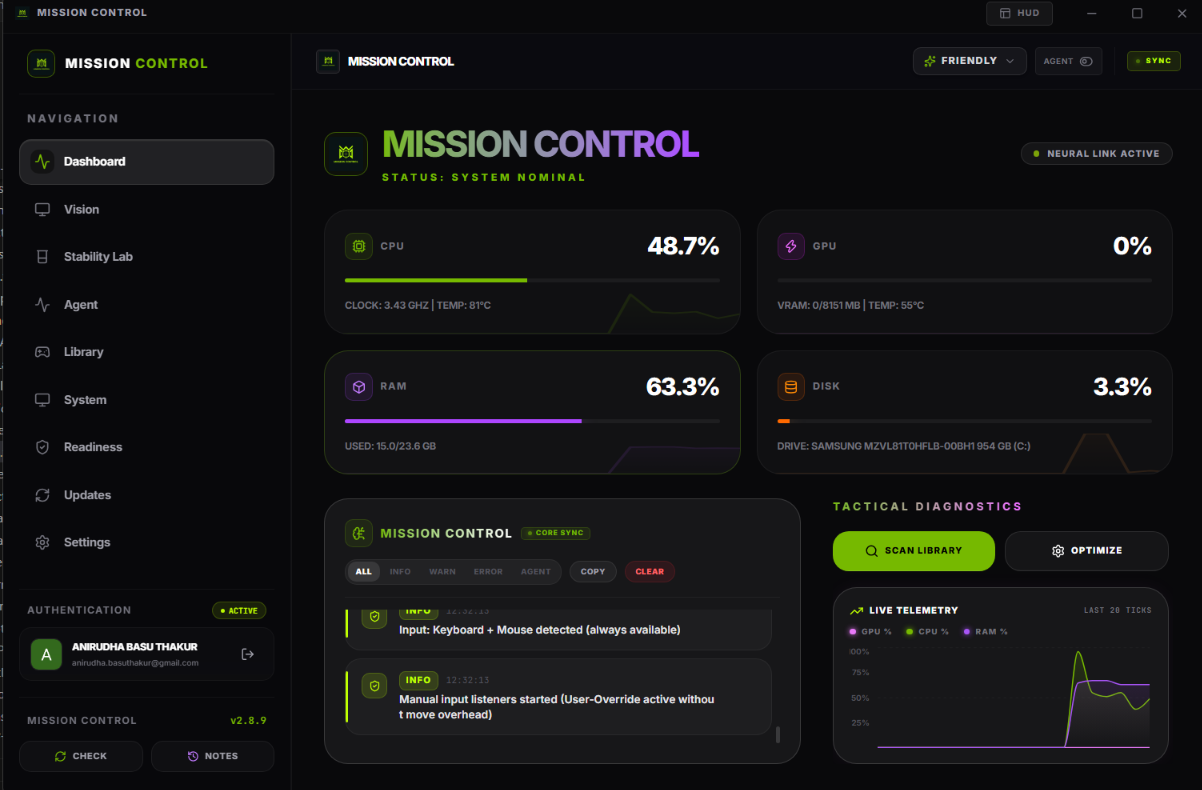
1. Central System Dashboard
Displays active telemetry indicators (CPU utilization, GPU load, RAM constraints, and Disk diagnostics) in a clean dark UI, alongside strategic agent event logs.
2. Game Library Launcher
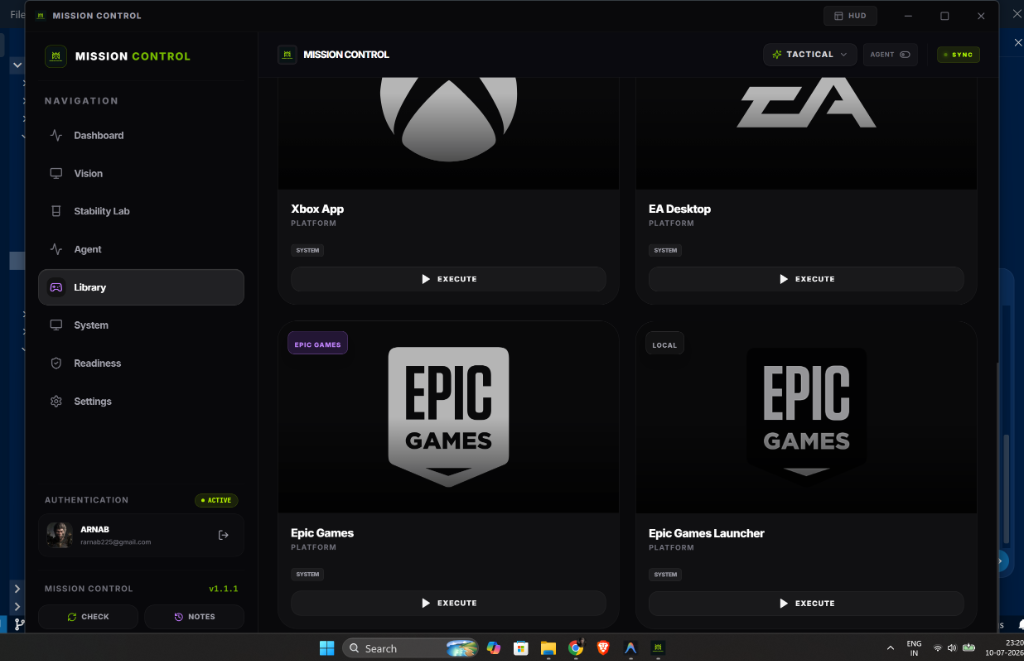
Aggregates local system launchers (Xbox App, EA Desktop, Epic Games) in one centralized interface for easy deployment.